A practical guide to sources, routing, all six character models, four OUTPUT filter families, recording and AUv3. Control names match the current interface. Updated November 20, 2026.
All 11 chapters.
No matching chapter. Try a control name or clear your search.
Your first sound
Select DEMO and press PLAY, or use FILE to import your own audio.
Select Slot A and a model. Its separate ON / OFF control enables the stage.
Start with MIX at 100. Compare with the slot off, then adjust SOFT CLIP and ANALOG.
Add Slot B when you want another process. Choose A → B SERIES to stack them or A / B SWITCH to choose between two paths.
Open OUTPUT for a final filter, compressor or limiter. Enable each stage separately.
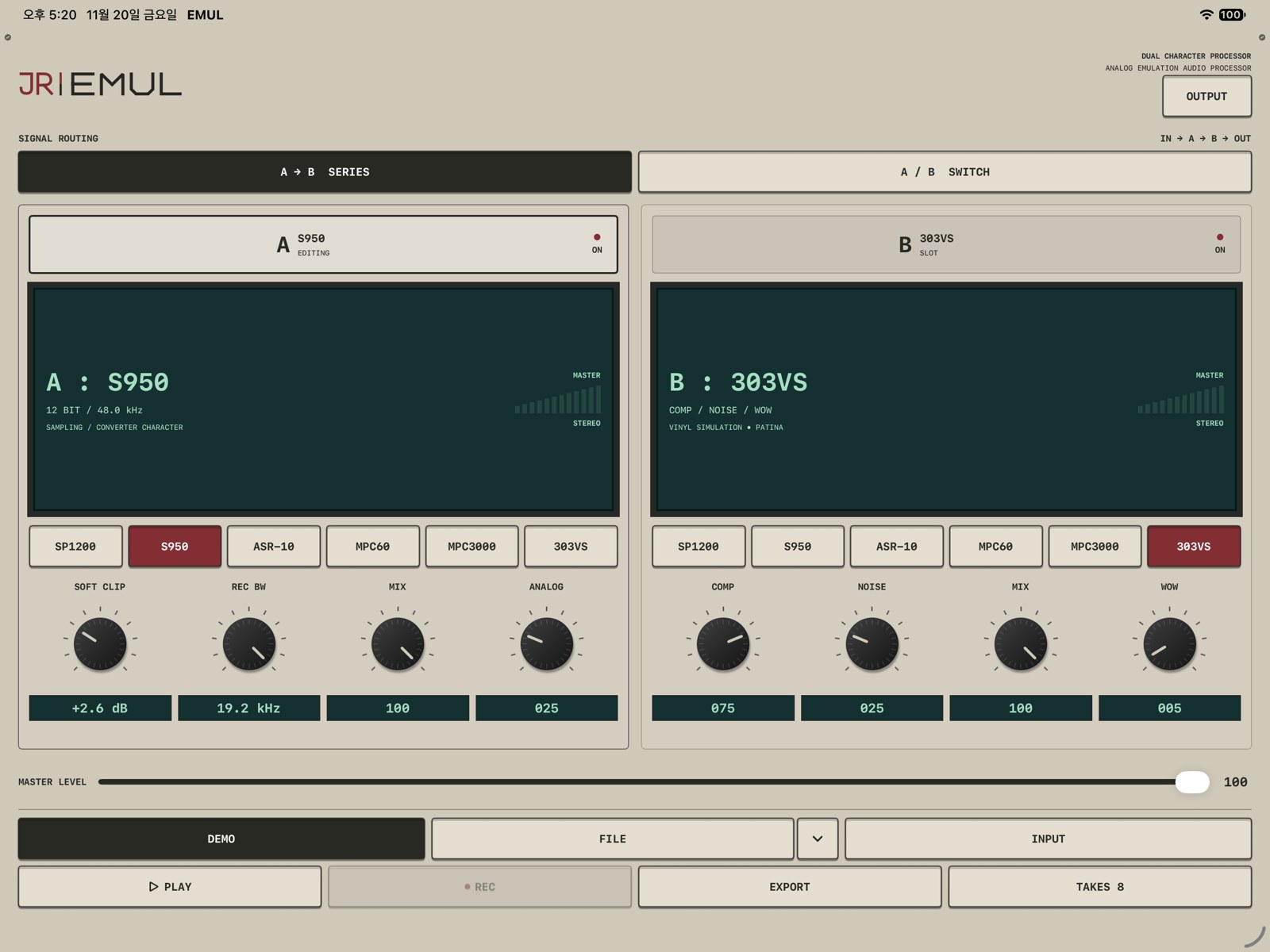
Actual iPad screen. Compact layouts use one editor at a time.
Fresh state: SERIES, Slot A SP1200 ON / RAW, Slot B OFF, MASTER LEVEL 100. SP1200’s musical starting point includes about +2.6 dB SOFT CLIP and ANALOG 25. For a converter-only comparison, turn both down explicitly.
Sources and playback
DEMO, FILE and INPUT
DEMO is the introductory loop. FILE imports audio on first use; once a file is registered, it selects that file. To replace it, open the adjacent chevron and choose FILE OPTIONS → IMPORT AUDIO….
PLAY starts or stops looping DEMO / FILE. A stopped source remains selected; the PLAY key is highlighted while it runs.
INPUT enables live monitoring and processing when selected. It does not need PLAY; PLAY is disabled in INPUT mode. Allow microphone access and check the active audio route. The state line shows INPUT MONITORING or INPUT READY — TAP INPUT TO CONNECT.
After your first import
The main row focuses on FILE / INPUT. The demo remains under FILE OPTIONS → TRY DEMO. TRY DEMO selects it stopped, so press PLAY to hear it.
The app copies imported audio into local storage and restores the registered name on relaunch. Playback stays stopped. If the saved file is missing, the display says FILE UNAVAILABLE — IMPORT AUDIO; use FILE OPTIONS to replace it.
Imports must be nonempty mono or stereo audio decodable by the system. A failed import keeps the previous valid source.
Routing, slot power and gestures
A → B SERIES: audio passes through A, then B. Selecting a slot header changes the editor, while both enabled slots continue to contribute.
A / B SWITCH: A and B are alternate paths. Selecting a header chooses both the audible path and its editor. The other slot is marked STANDBY.
Each slot retains its own model, settings, power and MIX. Selecting a slot is separate from switching it ON / OFF.
MIX blends a stage with its latency-aligned input. In SERIES, Slot B’s dry reference is the result arriving from Slot A.
Knob gestures and reset
Drag vertically: upward increases, downward decreases. Double-tap to restore a knob’s default. VoiceOver supports adjustment and a Reset action.
RESET A / RESET B → Reset controls resets that slot’s controls while retaining its chosen model and power. It restores SP RAW color and normal ASR clock for the slot.
On a phone, one editor is shown at a time. iPad layouts can show both racks side-by-side or stacked when space permits. Routing behavior is shared.
The six character models
Sampler families share SOFT CLIP, a model-specific tone or bandwidth control, MIX and ANALOG.
SOFT CLIP: OFF to +9.0 dB indicated drive, with a rounded peak transition. It is a creative stage separate from the final limiter.
ANALOG: 0–100, an optional shared JR circuit-inspired output color. Zero removes it. It is not an exact model-specific original DAC circuit.
Model
Character
Controls
SP1200
12-bit / 26.04 kHz family
OUTPUT COLOR: RAW / WARM / DYNAMIC. TONE affects DYNAMIC only. Selecting DYNAMIC from another color starts at TONE 100, its most open relative setting.
S950
Variable recording bandwidth
REC BW 3.0–19.2 kHz changes the modeled native clock from 7.5–48 kHz. This is separate from OUTPUT CUTOFF.
ASR-10
Normal / low system clock
CUTOFF 000–150; 150 OPEN is the maximum. It is a model control position, not Hz. SYSTEM CLOCK chooses 44.10 / 29.76 kHz.
MPC60
Fixed playback filter
FILTER is shown as FIXED ≈ and is not adjustable. Use OUTPUT if you want an additional filter.
MPC3000
Variable model filter
FREQ 000–100; 100 OPEN is the maximum. These are model positions, not a Hz scale.
303VS
Vinyl Simulation
COMP / NOISE / MIX / WOW, each 0–100. JR’s PATINA-derived compression, procedural surface texture and mechanical pitch-motion direction.
SP1200 output colors
RAW leaves conversion grain more exposed. WARM applies fixed treble softening. DYNAMIC provides restrained moving-filter color. RAW and WARM show a filter summary rather than an active TONE knob.
Switching model loads its tone starting point; it does not reset all shared controls. Saved or automated sound values are restored explicitly rather than treated as a new model-selection preset.
OUTPUT: filter reference
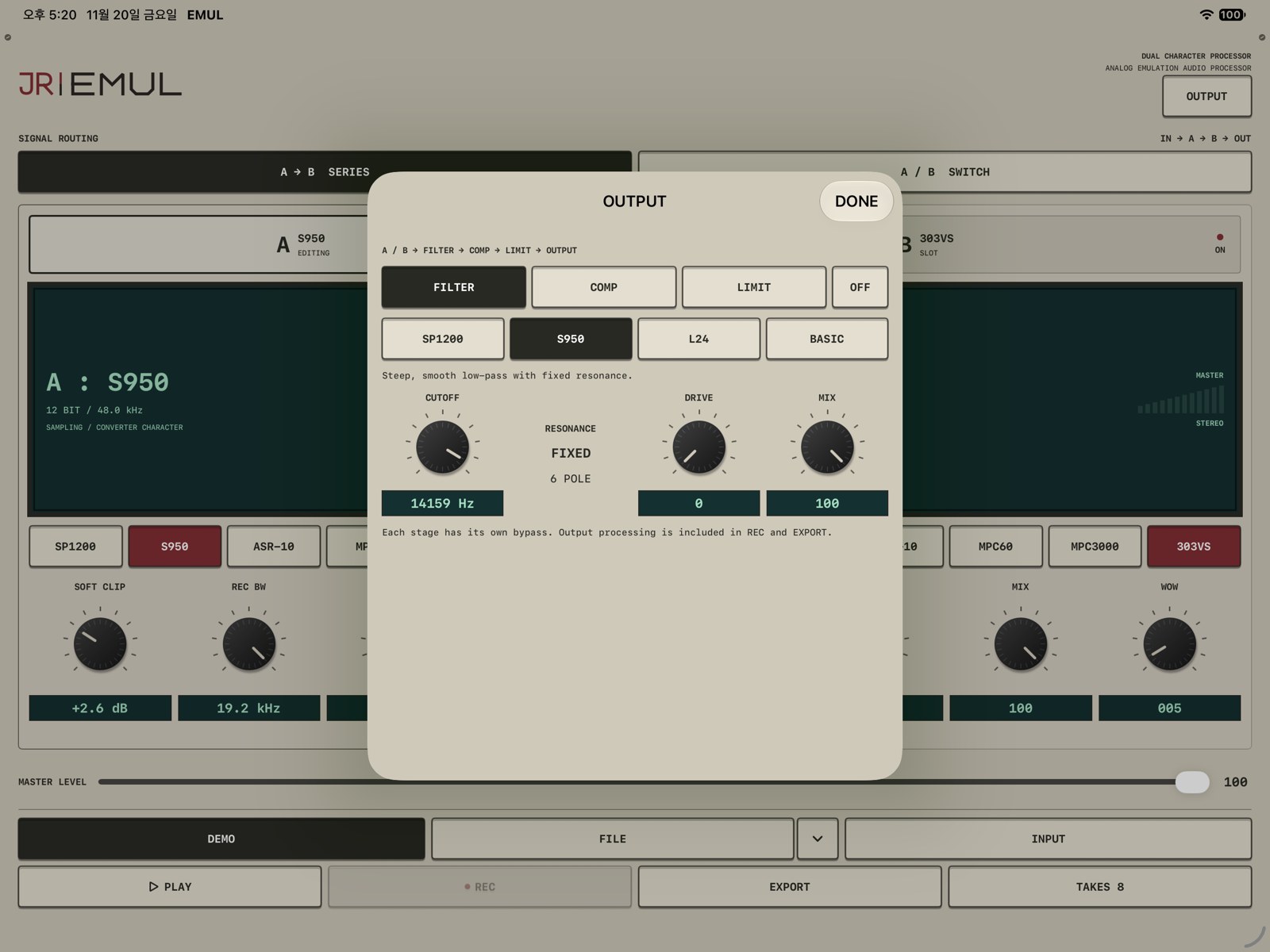
Open OUTPUT → FILTER, choose a family, then use its separate ON / OFF key. Choosing a family alone does not enable the stage.
Actual OUTPUT screen with S950 selected. The stage power is separate from the family selector.
Control
Range / behavior
CUTOFF
Displayed 20 Hz–20 kHz with logarithmic travel. The upper usable edge follows the working/host sample rate.
MOTION / RESONANCE
0–100. SP1200 uses MOTION; L24 and BASIC use RESONANCE. S950 is FIXED / 6 POLE.
DRIVE
0–100. Soft nonlinear shaping before the filter. A color amount, not a calibrated dB gain.
MIX
0–100. 100 is fully filtered; 0 is latency-aligned dry. Filter phase remains part of the sound.
SP1200 — four-pole color
Four-pole low-pass behavior informed by the SSM2044 family, plus output contour. CUTOFF sets brightness. MOTION adjusts a small signal-responsive cutoff lift; it is not resonance or a self-oscillation control. Try low DRIVE and restrained MOTION on drums.
S950 — steep six-pole response
A smooth MF6-family six-pole low-pass with fixed resonance. Use CUTOFF to set its upper edge. The standalone OUTPUT filter does not add S950 conversion, recording emphasis or the sampler’s playback compensation.
L24 — resonant ladder
A 24 dB/octave ladder low-pass with soft drive. RESONANCE emphasizes the cutoff region. This offers stronger tone gestures than the fixed-resonance S950 family; it is not presented as a specific hardware-unit clone.
BASIC — LP, HP and BP
LP retains lows and softens highs. HP removes low-frequency weight. BP isolates a region around cutoff. RESONANCE adjusts focus around that region.
Starting and changing a filter
Set MIX 100 and DRIVE 0, enable FILTER, then find CUTOFF.
Add MOTION or RESONANCE if the selected family provides it.
Add DRIVE for color, or lower MIX to blend.
Changing family preserves cutoff, drive, mix and on/off state while loading an appropriate character starting point. Fresh FILTER state is BASIC / LP, about 14.16 kHz cutoff, DRIVE 0 and MIX 100, with FILTER OFF.
Sampler filters and OUTPUT filters are two layers. SP RAW / WARM / DYNAMIC and S950 REC BW belong inside the chosen model. OUTPUT processes the result after the slots, so enabling another filter can deliberately darken it further.
Compression, master and limiter
The actual final order is slots → FILTER → COMP → MASTER LEVEL → LIMIT. FILTER, COMP and LIMIT each have an independent ON / OFF key and start bypassed in a fresh setup.
COMP
AMOUNT / SPEED / CHARACTER / MIX are 0–100 controls. Use AMOUNT for strength, SPEED for response feel, CHARACTER for contour and MIX for the parallel balance. These are musical macros rather than a published ratio/attack-time specification.
MASTER LEVEL
MASTER LEVEL feeds the final limiter. Set it with the limiter’s ceiling and activity in mind.
LIMIT
Control
Range
DRIVE
+0 to +12 dB
CEILING
−6.0 to −0.1 dB; default −0.3 dB
RELEASE
Displayed 20–400 ms; default 115 ms
This is a lookahead sample-peak limiter, not a certified true-peak limiter. Filter, compressor and limiter settings are included in both REC and EXPORT.
REC: capture a performance
Start PLAY for a file, or select INPUT for live audio.
Tap REC to capture the final master output, including the selected routing and OUTPUT stages.
Perform your control changes.
Tap STOP REC to save the take. Playback or monitoring can continue.
Stop recording before changing source. If playback stops or an interruption occurs, recording is finalized.
REC writes stereo 24-bit WAV at the actual mixer/output sample rate. The requested standalone rate is 48 kHz, but the active audio route can set a different mixer rate. Long captures can use RF64. On the next launch, the app checks for recoverable partial captures from an interruption.
EXPORT: render a source file
Select DEMO or an available FILE, set the sound, then tap EXPORT. Playback may be stopped. The app snapshots the settings at the start and processes the entire selected source; it does not recreate gestures performed later.
The result is stereo 24-bit / 48 kHz WAV, with processing latency removed and a short tail added. INPUT uses REC instead.
A progress percentage replaces EXPORT. Tap it again, or use CANCEL EXPORT in TAKES, to cancel. Successful renders appear in TAKES. Cancelling removes the partial export and does not replace the registered source.
TAKES: preview, share and resample
Open TAKES for saved audio, newest first, with its source and chain summary.
Action
What it does
PREVIEW / STOP
Plays the stored audio directly, without applying the chain a second time. Preview stops the running source temporarily.
SAVE / SHARE
Opens the system share sheet for the stored WAV.
RENAME → SAVE NAME
Changes the take name. Up to 100 characters; slashes and colons are not accepted.
USE FILE
Registers the processed take as the next FILE source. Playing it applies the current chain again, for intentional resampling.
RECALL FX
Uses a take’s saved settings when this action is available for a compatible take. The current version enables it only for some older takes.
DELETE
Asks for confirmation before deleting that take; this is not an archive or undo system.
The ellipsis menu contains additional take actions. INPUT monitoring can resume when the library closes if it was active before preview.
Take metadata stores EXPORT’s start settings or REC’s ending settings. The library persists across relaunch. Standalone sound settings also save automatically; the app does not currently present a separate named factory-preset browser.
PREVIEW hears the saved result. USE FILE intentionally processes that result again. Choose the one that matches your aim.
AUv3 host operation and automation
Insert JR EMUL as an audio effect in a compatible host. Route audio and manage transport or recording in the host.
The standalone DEMO / FILE / INPUT / PLAY / REC / EXPORT / TAKES row is hidden inside the plug-in. Slot routing, character controls, MASTER and OUTPUT remain.
The parameter tree exposes model, power, mix/color, routing, A/B selection and OUTPUT controls. Continuous values support ramps; model and other discrete choices switch. The host can save and restore the plug-in’s sound state in a project.
The supported processing formats are mono or stereo input with stereo output, matching input/output rate, from 22.05–96 kHz. Reported latency is 254 samples; let the host compensate it. Physical audio routing, buffers and transport behavior depend on the host and device.
Settings and troubleshooting
No sound
Check the selected source, PLAY for DEMO / FILE, INPUT connection and microphone permission, MASTER LEVEL, and the host’s audio routing. In SWITCH, a slot marked STANDBY is not the selected path.
A tone or filter knob is unavailable
SP RAW / WARM and MPC60 are fixed paths. Select SP DYNAMIC for its tone control, or use optional OUTPUT filtering. S950 OUTPUT resonance is intentionally fixed.
S950 changes after enabling OUTPUT S950
The sampler’s internal record/playback path is already active. OUTPUT adds another filter after it.
A saved take changes when used as FILE
USE FILE applies the current chain again. PREVIEW plays the saved result directly.
EXPORT is unavailable
Choose DEMO or an available FILE, stop recording, and allow source work to finish. Capture INPUT with REC.
RECALL FX is unavailable
The current interface enables it only for some older compatible takes. This does not prevent the stored audio from being previewed, shared or used as FILE.
Relaunch and missing files
Sound settings and the file registration persist, but playback does not restart automatically. Replace missing audio through FILE OPTIONS. A missing registered file is not silently replaced with the demo.